
Cloud Video Surveillance & Storage. Without the Hardware.
Modernize your security cameras with secure cloud recording and remote access. Camcloud lets you manage footage across all locations without the complexity of NVRs and DVRs.


A modern platform that outperforms other cloud video surveillance solutions.

HARDWARE-FREE
Eliminate the need for complex on-site gateways and NVRs. Connect compatible IP cameras directly to the cloud for secure video recording and storage, without the cost and complexity of traditional surveillance hardware.
OPEN PLATFORM
Choose from a wide range of IP cameras that offer easy and secure plug-and-play setup. Camcloud simplifies IP camera cloud storage and recording, eliminating complex network configuration and proprietary hardware restrictions.
WORLD CLASS AI
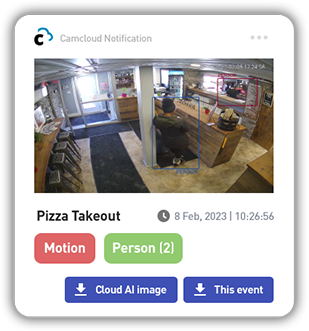
Go beyond basic camera motion detection with advanced Cloud AI that identifies people, vehicles and other activity that matters. Make your cloud video surveillance smarter with actionable insights and faster event search.
No need for multi-location enterprises to struggle with complex on-premise video surveillance systems.


CLOUD STORAGE
Securely store your surveillance footage off-site with Camcloud’s cloud video surveillance storage. Whether you’re managing a single location or hundreds of cameras across multiple sites, Camcloud makes it easy to record, access and manage your security video in one place.
Choose from 7 Days to 90 Days cloud video recording with optional archival storage for up to 2 years. Your footage is accessible through our intuitive multi-camera Timeline on web and mobile apps. Eliminate the complexity of traditional on-site storage while keeping your critical video secure and readily available.

EVENT EXPLORER
Easily access all your important events captured by your cameras and Cloud AI with the Event Explorer tool, allowing you to easily review large volumes of video with up to 16x fast forward, save common searches as Views that can be accessed with one-click and take your Cloud AI to the next level by creating advanced filters using booleans.

OPEN DEVICE SUPPORT
Use the cameras you want with Camcloud. Our open platform supports a wide range of IP cameras, including leading brands such as Axis, Milesight, Hanwha Vision, Amcrest, Hikvision, Helix, Speco and more.
Whether you’re looking for Hikvision cloud storage, IP camera cloud recording or a way to connect existing CCTV cameras to the cloud, Camcloud offers flexible integration options without locking you into proprietary hardware.

EDGE ANALYTICS & AI
Many of the current generation of IP cameras all have sophisticated analytics and artificial intelligence (AI) capabilities to detect everything from smart motion detection to next generation people and vehicle detection. Camcloud offers integration with these advanced analytics and artificial intelligence capabilities right from the cloud, and users will be alerted and can search for these AI events on the Camcloud Timeline.

MULTI-SITE MONITORING
Monitor and manage security cameras across multiple locations from a single cloud platform. Camcloud brings together live video, recorded footage, camera management and user access, making it easy to oversee your entire surveillance system.
Organize cameras into groups, manage user permissions and access your security video cloud storage from anywhere using our web and mobile apps. Whether you manage one property or hundreds of locations, Camcloud simplifies CCTV video management.
CAMERA CONTROLS
Through our premium camera integrations, customers can control their cameras through our web and mobile apps. Advanced camera features such as 360 video capture and mobile dewarping, Pan Tilt Zoom (PTZ), motion detection areas, low light settings and video quality are all available with the Camcloud solution.
CAMERA HEALTH CHECKS
Let Camcloud tell you when there’s a problem with one of your cameras. If our cloud servers can’t connect to your camera, you’ll receive an alert that something could be wrong. Take advantage of our advanced cloud notification system that will work across all connected cameras. Camera Health Check and motion alerts are centrally managed and sent to your mobile device or email.
EDGE STORAGE
Combine cloud video recording with local storage options, including camera SD cards and Network Attached Storage (NAS). Camcloud supports a flexible approach to surveillance video storage, allowing you to maintain local recording capabilities alongside your primary cloud storage solution.
If a camera or site loses internet connectivity, supported local storage options can continue capturing events for later review through your cloud apps.
Covering all the bases for your cloud video surveillance needs.
You’ll wonder how you ever managed your business without it.
- Cloud
Storage - EVENT
EXPLORER - OPEN DEVICE
SUPPORT - EDGE
ANALYTICS & AI - MULTI-SITE
MONITORING - CAMERA
CONTROLS - CAMERA
HEALTH CHECKS - EDGE
STORAGE
“I recommended Camcloud since all the other cloud providers required on-premise hardware to function. For Monroe Group, it made no sense to replace a legacy CCTV system with an updated system that still requires on-premise equipment.”
Frequently Asked Questions
What is cloud video surveillance storage?
Cloud video surveillance storage allows security cameras to securely transmit recorded footage to an off-site cloud platform rather than relying entirely on an on-premise NVR or DVR. With Camcloud, you can store, access and manage surveillance video from multiple cameras and locations through a single web or mobile interface.
How do I save security camera video to the cloud?
To save security camera video to the cloud, connect your compatible IP cameras to a cloud video surveillance platform like Camcloud. Supported cameras can connect directly to the cloud, eliminating the need for an on-site recorder. Once configured, your cameras can securely upload footage for remote viewing, playback and storage. Camcloud’s setup wizard lets you add supported cameras through its web or mobile apps.
What is the best cloud storage for CCTV cameras?
The best cloud storage for CCTV cameras should offer secure video recording, reliable remote access, flexible retention options and compatibility with your existing cameras. Camcloud combines these capabilities with centralized camera management, Cloud AI and advanced event search, making it a comprehensive solution for businesses looking to modernize their CCTV systems.
Can I use Camcloud for Hikvision cloud storage?
Yes. Camcloud supports Hikvision cameras and provides options for connecting compatible devices to cloud video surveillance storage. This allows businesses to use existing Hikvision cameras for cloud recording, remote access and centralized video management. The connection method depends on the camera model and network configuration.
Does Camcloud support IP camera cloud recording?
Yes. Camcloud supports cloud recording for a wide range of IP cameras from manufacturers including Axis, Hanwha Vision, Amcrest, Hikvision, VIVOTEK and others. Compatible cameras can securely transmit video to the cloud, making it easy to access recordings without relying exclusively on traditional on-site storage.
Is cloud storage the only capability offered by Camcloud?
No. Camcloud is a complete cloud video surveillance platform, not just a cloud storage service. In addition to secure video recording and storage, Camcloud offers live viewing, centralized camera management, Cloud AI analytics, advanced notifications, Event Explorer, camera health monitoring and multi-site management. These capabilities help businesses manage their entire video surveillance operation from a single platform.
Can I monitor CCTV cameras remotely with Camcloud?
Yes. Camcloud lets you monitor live CCTV camera feeds and review recorded footage remotely using web and mobile apps. Instead of relying on dedicated CCTV surveillance monitors at each location, authorized users can securely access their cameras from virtually anywhere. For businesses managing multiple sites, Camcloud provides a centralized alternative to traditional CCTV camera monitoring systems.
How long can I store CCTV recordings in the cloud?
Camcloud offers cloud video recording plans with retention periods from 7 to 90 days, with optional archival storage for up to 2 years through Cold Storage. Businesses can select a plan and archival options that match their recording and retention needs.
Is cloud storage safe for security cameras?
Cloud storage can offer significant security and reliability advantages over traditional on-site recording. By storing surveillance footage off-site, businesses reduce the risk of losing recordings due to damaged, stolen or failed local recording equipment. Camcloud provides secure cloud-based video storage and centralized access management to help protect your surveillance footage.
Can I use cloud video surveillance with my existing CCTV cameras?
In many cases, yes. Camcloud’s open platform supports a broad range of IP cameras, allowing businesses to modernize their video surveillance systems without replacing all their existing equipment. Compatible cameras can connect directly to the cloud, while other devices may require additional configuration or a gateway. This flexibility makes Camcloud a practical option for upgrading existing CCTV installations. Check our supported cameras to explore compatible brands and connection options.
How is cloud storage different from local camera storage, and what happens if the internet goes down?
Local storage keeps video recordings on-site using a camera’s SD card, Network Attached Storage (NAS), or a local Video Management System (VMS). Cloud storage securely stores footage off-site, enabling centralized access and management from anywhere.
Camcloud supports cloud, hybrid, and local deployment options. With Camcloud VMS, businesses can record video locally using existing cameras and hardware, while optionally extending their deployment with cloud storage and management capabilities.
If internet connectivity is lost, cloud recording and remote access may be interrupted, but cameras connected to Camcloud VMS can continue recording locally. Once connectivity is restored, cloud services resume. Recording and recovery capabilities depend on the deployment configuration.
Resellers
Learn how you can offer Camcloud to your clients with our industry leading partner program.
Business
Discover how our leading cloud video surveillance platform is purpose-built for video surveillance at your business.
Ready to get started with Camcloud?
Contact us to schedule a demo or get pricing.